

2026: the year we have the power of the world at our fingertips with AI, and for some reason, with all this power, threat actors are reverting back to the basics. Across numerous recent cases, the MWR Incident Response team has identified a trend in what is believed to be a single organised crime operation, or even a handful of individuals, using a remarkably simple approach not only to compromise entire Active Directory domains, but to get themselves into position to commit large-scale fraud.
The goal of these individuals appears to be strictly targeted at financial institutions, especially within Africa. Although they have been in a position to exfiltrate large amounts of sensitive data, or even ransomware a large majority of the compromised environments, they have consistently focused on one goal: using legitimate mechanisms to commit fraud that leads to direct monetary payouts. Some attempts have failed due to detection and subsequent investigation, but there is no doubt that this group has found a formula that works, one that has likely led to millions of rands in payouts.
What makes this group worth writing about is not their sophistication, but the opposite. In this post we follow them end to end: from the insider who provides the initial foothold, through the legitimate, signed software they abuse to take control, the dormant Windows accounts they hide behind, and finally the data stores and payment solutions they were really after. At almost every step, the most striking thing is how simple the executed actions are — so simple that they don’t even trip default security alerts.
Introducing the Not-So-Advanced Persistent Threat: Dull Knife
Before we dive head first into unpacking the different elements that make Dull Knife incredibly effective, some context is required. As there will be some technical details provided during this blog post, as well as the subsequent blog post surrounding the activities conducted by Dull Knife during the infiltration of the affected organisations. Microsoft Defender will be used to highlight the visibility that was identified. This aims to show how few detections these activities trigger in one of the more comprehensive and common EDR products on the market.
As the next blog post will be the more technical of the two, detection rules and how to identify if Dull Knife are present will be provided in that blog post rather than this one.
The People Problem: An Insider Threat
As anyone working in cyber security is constantly reminded, the “people” element of a business is one of the largest areas of concern when it comes to potential incidents. Social engineering attacks such as phishing have always targeted this element, which is why larger organisations pushed so hard to minimise their potential for success. Mail filters, application allow-listing and Mark-of-the-Web protections were all implemented to stop these attacks from landing.
We are accustomed to seeing the occasional employee download and install malware accidentally, often through pirated software. But in recent years we have seen a marked uptick in employees intentionally executing malware. As incident responders we do not always get to the bottom of why, but through discussions with the organisations investigating these cases, the belief is that employees are being offered large sums of money to execute malicious code on behalf of organised crime syndicates or APT groups. Given the difficult financial situation facing much of the globe, and Africa in particular, it is almost surprising that this approach has only made noticeable waves somewhat recently.
No matter how many controls we implement to prevent the accidental execution of malware, prevention becomes far harder when the employee is acting deliberately. Whether inadvertent or intentional, the result is the same: the threat actor benefits from insider knowledge. Employees know exactly what restrictions are imposed on them, which means that when they execute malware successfully, they have usually bypassed those preventions on purpose.
Execution in and of itself is also not enough for threat actors these days, and as a result the malicious insiders are also requested to provide credentials for accounts. With Dull Knife specifically, we have seen a trend towards the acquisition of credentials for shared administrative accounts to maintain their foothold namely accounts with credentials known to, and used by, multiple employees across the network. This shared ownership is precisely what made them valuable to a malicious insider. Because routine use by many staff members obscures any single individual’s activity, attribution becomes extremely difficult. Compounding this, far more people tend to know the credentials for these accounts than should, which widens the pool of suspects in any credential leak investigation.
There’s a RAT in My Kitchen: Remote Access Tooling
So what are the malicious insiders executing? Is it custom malware? Not even close. Let me introduce the greatest piece of legitimate malware ever created: Remote Access Tooling.
What is remote access tooling? In TeamViewer’s own words:
Remote access software is a tool that enables users to control and interact with computers or devices from distant locations over the internet or networks.
Effectively it gives you the exact same control you would have if you were sitting directly in front of the machine, from anywhere in the world. Most of us have heard of the common tools, such as AnyDesk and TeamViewer, but as with any product category there are countless variations, opening an endless world of remote access potential. Numerous organisations legitimately utilise these products, mostly for employee support and administration.
This legitimacy is why these products are so loved by threat actors. None of the common security products natively deem these products as malicious in nature. By default, no alerts are generated during the deployment of these pieces of software, and unless custom detection rules have been put in place or proactive threat hunting is being performed, it is likely that this access will remain undetected. Even in the case of implementing detection controls for these pieces of software, it would require constant updating due to the ever-increasing number of these tools being developed.
This particular group favoured a selection of lesser-known Remote Access Tools (RATs), but the one that had the greatest success was Supremo Remote Control.
Supremo-ly Annoying: Why Supremo Works So Well
After downloading the tool using their favourite browser, the insider would execute or install the Supremo application. The reason for the separation of installation and execution is that, by default, Supremo is simply a standalone binary that can be executed for single use, but it also provides a mechanism for the program to persist between reboots, similar to a traditional program installation. Before providing more context on the use of these RATs by our APT group, if you wish to understand the technical details behind a number of these Remote Access Tools, specifically understanding their operation and what can be accomplished using them, please see the follow-up blog post to this one, which will be released in a few weeks following this release.
At first execution, the power of these legitimate Remote Access Tools can already be seen with the User Account Control (UAC) prompt shown to the user. The image below highlights that this software is not only signed, but it is signed by a trusted publisher. With legitimate signed binaries there comes an inherited sense of trust and belief that these systems are legitimate and don’t open our organisations up to risk. This is technically true for these products, as they do exactly what is advertised on the box; however, when used by those with malicious intent, these products become a portal into our networks.
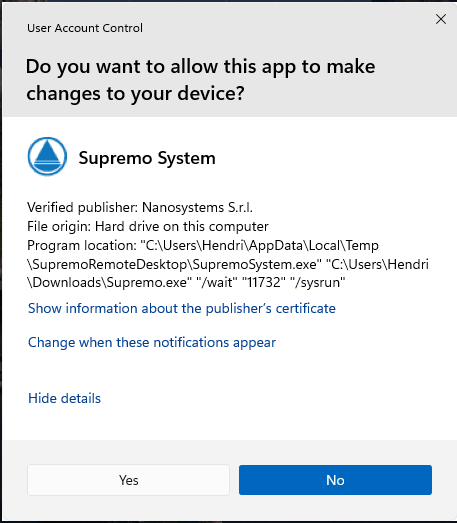
Figure 1: The User Account Control prompt shown at first execution where Supremo is signed by a trusted publisher.
In a majority of the executions we have seen, the approach to install Supremo is used. This is believed to be due to the ability for the installer to set a static password that can be used instead of the randomly generated password provided by Supremo. This password can be permanently used alongside the provided session ID to authenticate to the remote system, even for the first connection. Obviously this would require that the threat actor and the malicious insider communicate the password that will be used; however, this could be agreed upon before the day of execution.
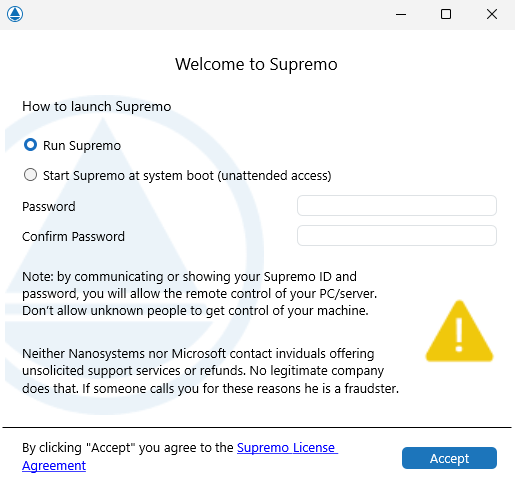
Figure 2: Setting a static password during the Supremo installation.
Additionally, with the installation approach, the Supremo process will run in the context of the SYSTEM user, providing the solution with effective control over the underlying host. This specifically allows the RAT to persist across user sessions, which means that no matter which user authenticates to the system, the threat actor will be able to connect to the system in that user’s context. For services that are installed as the SYSTEM user, administrative access is required; however, as we will see a little later, this seems to be a requirement for the threat actor to begin with, and likely comes up during discussions with the insider they are going to be paying. This registered service is shown below:
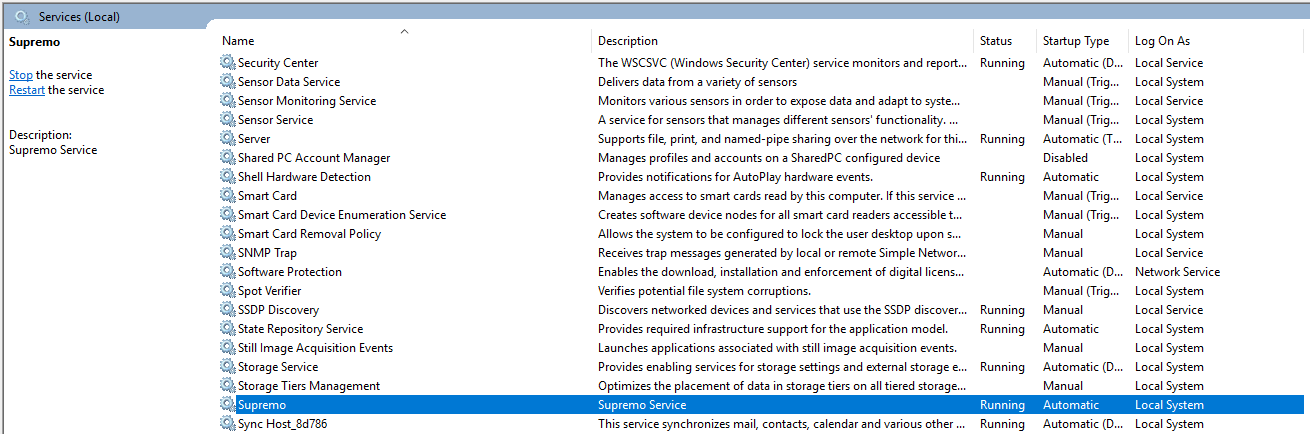
Figure 3: The Supremo service registered to run in the context of the SYSTEM user.
Further benefits of using Supremo include:
- A built-in file browser.
- The ability to minimise user notifications, through Windows notification disabling.
- Following installation, there is no requirement for users to accept connection prompts. With the session ID and password, threat actors can authenticate to the remote session without the legitimate user becoming aware.
- Multi-session support is present in the solution.
- It is entirely free.
With this information at our fingertips it is easy to see why threat actors are using this product. To provide a little more insight, the following screenshots show the visibility that Microsoft Defender for Endpoint (MDE) had during installation as well as during a successful connection. Note that there are no alerts to indicate any nefarious activity. All of the information provided in the following screenshots is considered general telemetry, and although there will be more activity in the telemetry, this is simply provided to highlight how it blends in with normal telemetry.
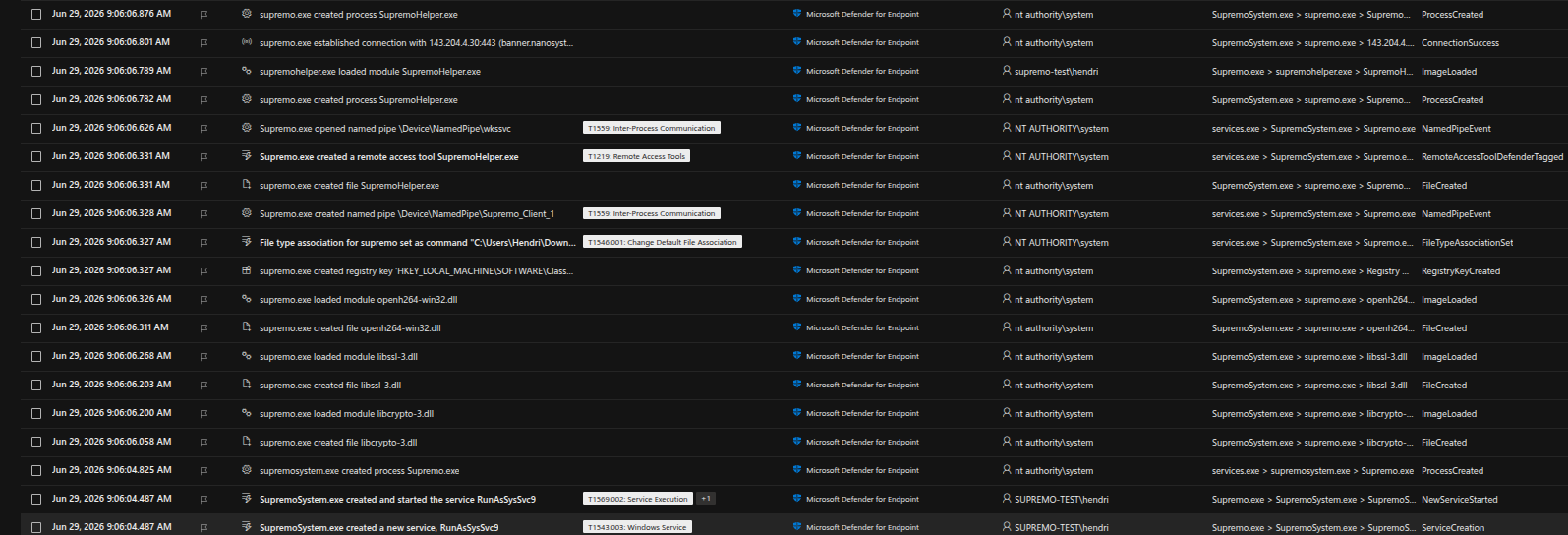
Figure 4: Microsoft Defender for Endpoint telemetry during the Supremo installation indicating no alerts generated.
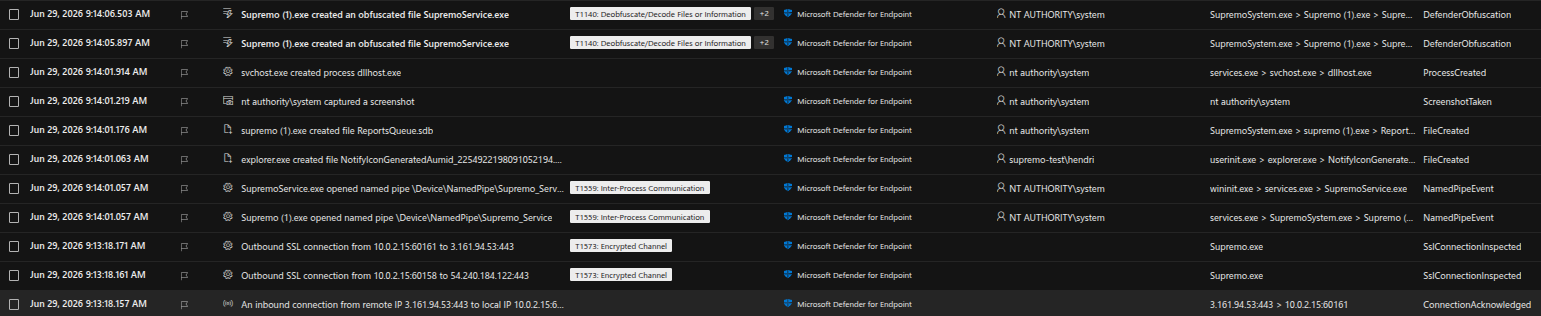
Figure 5: MDE telemetry during a successful Supremo connection where again, no alerts generated.
Server Me Up a Delicious Dish: Why Servers Are Compromised
Throughout the investigations involving this group, they never appeared to target user workstations, but rather targeted server infrastructure. This is likely due to a myriad of reasons:
- Servers behave differently to workstations, especially for RDP support of multiple sessions. By default they allow multiple simultaneous RDP sessions, ensuring that multiple users can still perform their job functions without interfering with one another, whereas Windows workstations are meant to only be used by a single user (the employee with direct access to the machine) at any given time.
- Servers are more likely to expose the functionality required for the threat actor to compromise their target. For this threat actor specifically, these targets were payment or transaction solutions where cash-outs could potentially be achieved.
- Servers are more likely to have numerous users constantly authenticating to them, resulting in a better potential for credential theft to result in additional account compromise. Especially in environments where the most recent Windows Server versions are not used. Although credential theft in this manner may not be required, the potential is there for the threat actor.
- Due to the numerous users that use these systems, there is a better chance that sensitive documentation is present on the system, allowing the threat actor to gain understanding of the network as well as the accounts that operate within it. Although they likely would have acquired a large amount of context surrounding the environment from the malicious insider, there will likely still be information the threat actor requires in order to fully understand the environment and the solutions they wish to target.
- Servers often have fewer network segregation controls enforced on them, and thus are more likely to provide adequate visibility of the internal corporate network for additional targeting.
Although Supremo was never deployed to a user’s workstation, every time Supremo was deployed it was preceded by an RDP authentication from a user’s workstation. On investigation of these workstations it did not appear that a direct compromise of these systems had occurred, which was how the presence of malicious insiders was identified. Unfortunately, in the investigated cases, these users commonly authenticated to the systems during their normal day-to-day operations, so creating detection rules to detect these RDP connections would not have been viable.
Keep It Local: Using Local Accounts as Separation
A little fundamental knowledge first. When you set up a new Windows system, more than one user account is created. The friendly interfaces, such as the “Accounts” page and the “Other users” page, only show the accounts that a user explicitly created and that are enabled. This is shown in the following images:
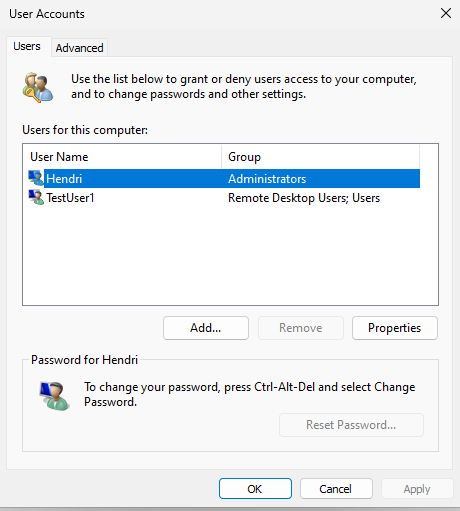
Figure 6: The Windows “Accounts” page, showing only explicitly created, enabled accounts.
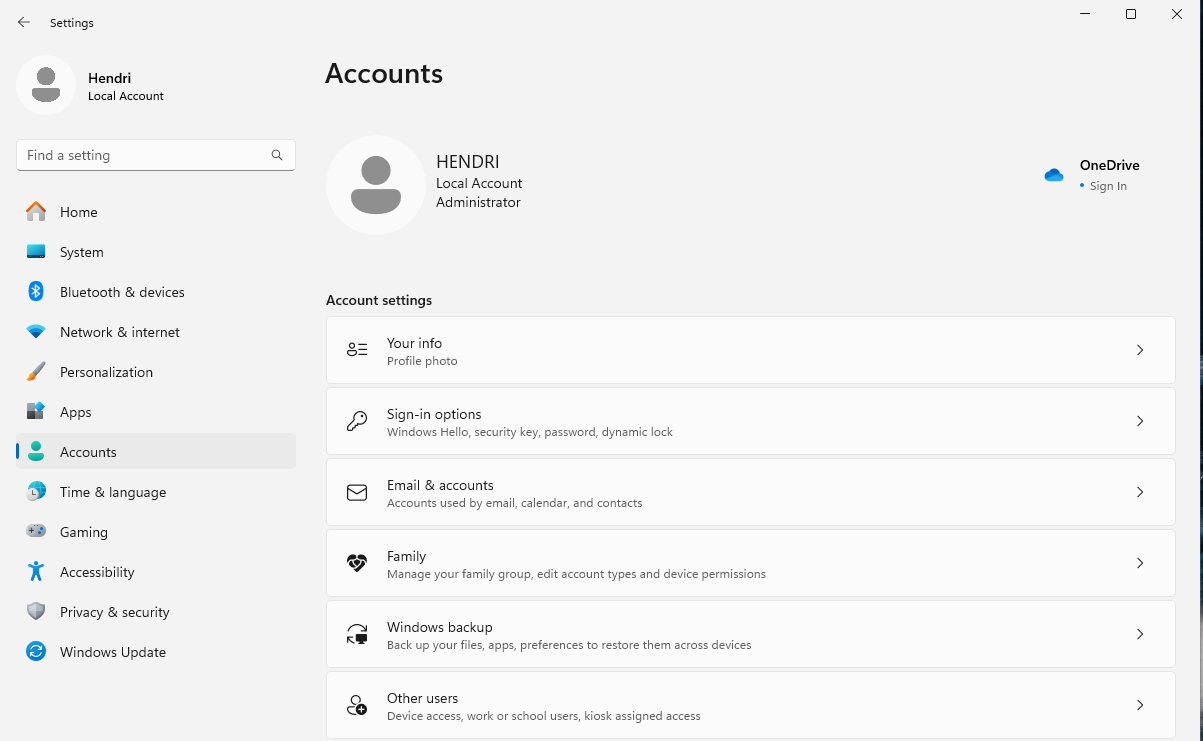
Figure 7: The “Other users” page which again showing only enabled, user-created accounts.
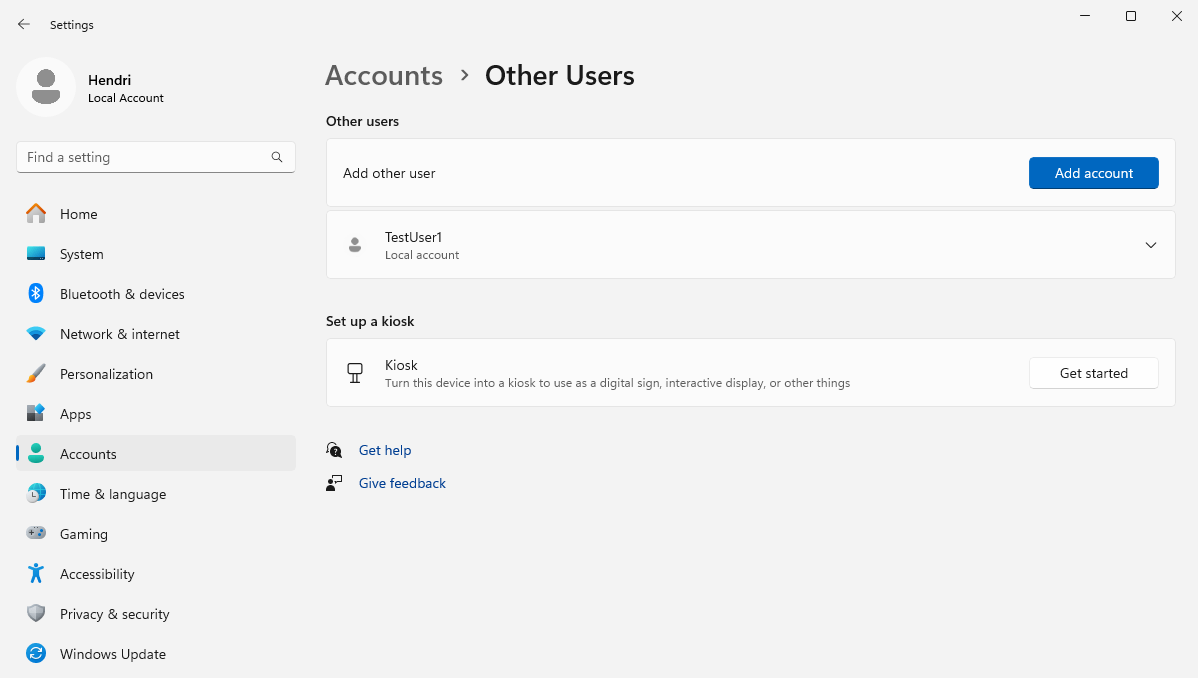
Figure 8: The built-in accounts remain hidden from the standard account management interfaces.
However, if you look a little deeper — such as through the use of the Local User Management application (lusrmgr) or the command line (net users) — you will see that there are actually numerous other built-in user accounts. It is important to note that these accounts will be “disabled” by default. This is shown for both the “Administrator” and “Guest” accounts below:
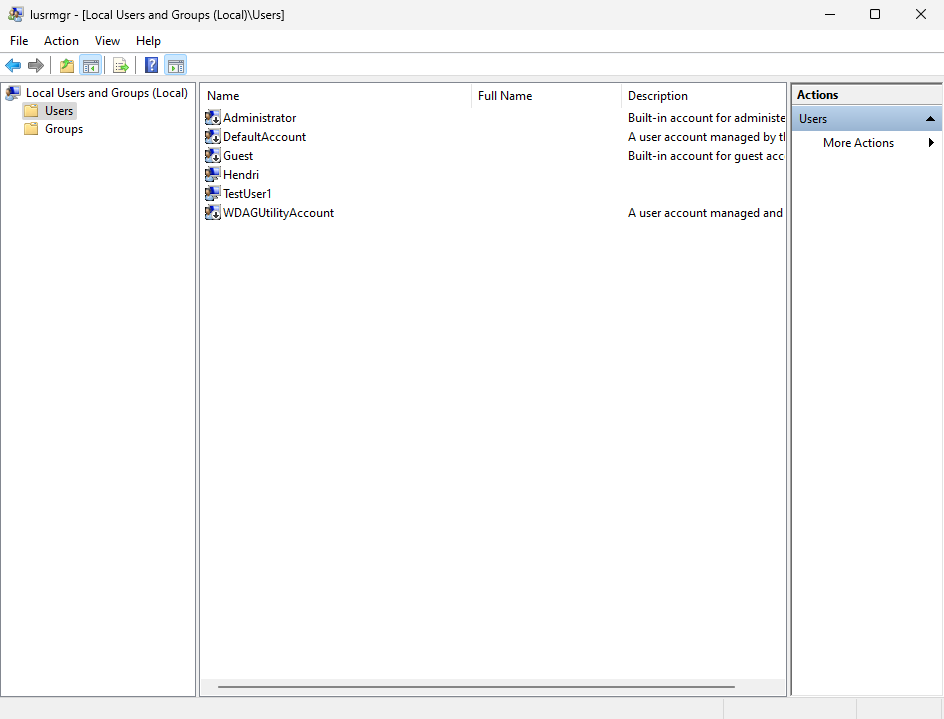
Figure 9: The Local User Management application (lusrmgr) revealing the disabled built-in accounts.
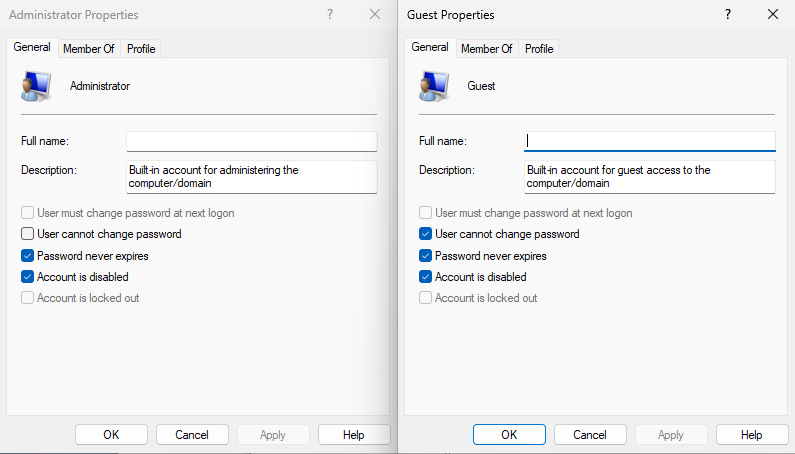
Figure 10: Native Properties for Both the Administrator and Guest User Accounts.
Following the successful execution of Supremo on a server, the threat actor established the active session to Supremo and immediately performed one simple function: to enable one of the built-in accounts, alter its password, and add it to a powerful local group such as Administrators or Remote Desktop Users. The mechanism they used to accomplish this was to open the GUI-based netplwiz.exe, a binary natively present on Windows systems. Using the Advanced features, you can make alterations to both users and groups on the local system. It is important to highlight that this requires administrative access to the system, which provides another reason why it appeared that administrative access was a requirement for the threat actor when working with a malicious insider.
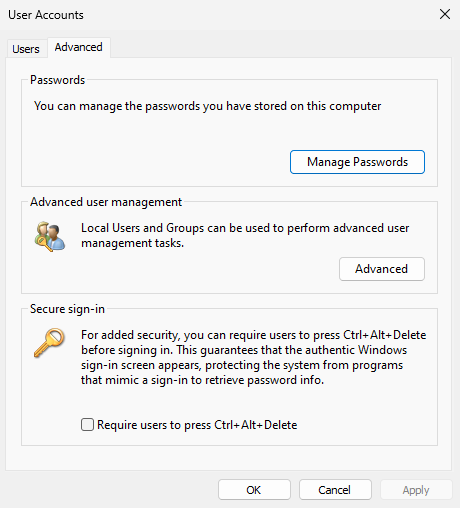
Figure 11: Using the Advanced features of netplwiz.exe to enable and modify a built-in account.
The threat actor commonly targeted two of these accounts, WDAGUtilityAccount and DefaultAccount, which once added to the Administrators group would effectively provide the threat actor with full control over the system. With this new account in hand, the threat actor would then RDP/authenticate to the same system they already had access to, in order to establish an authenticated interactive session with the newly enabled local account. This was performed to separate their access from the initial infection vector. From there they could continue to effectively use Supremo and remote desktop functionality without any other user having visibility of their activities on the system. With the way that Supremo works, in certain conditions this may also be considered a local authentication to the system, thus not utilising one of the allowed RDP connections to the system, further separating themselves from normal user behaviour.
Although the threat actor used these local accounts to perform direct operations on the host and to maintain a foothold, in some instances they would still use the initial account provided by the malicious insider to perform the lateral movement within the network, provided these accounts were not directly associated with the insider threat. Thus the separation of accounts wasn’t effective in these instances.
Clean Up Aisle 4: Removing Windows Event Logs
To frustrate forensic investigation into their initial entry vector and perhaps to reassure the malicious insider that detection was unlikely, the threat actor would use the original infection account to clear all of the Windows event logs. In some cases they also deleted Supremo from the user’s Downloads folder.
Investigators know this is not an all-encompassing, effective way to meaningfully reduce attribution; in modern cases it mostly just adds an annoyance to the investigation, especially with EDR solutions generating effective telemetry on all actions. Additionally, plenty of other evidence sources still tie activity back to a session: execution artefacts such as AMCache, ShimCache and the MFT; browser artefacts such as history; and the logs generated by the Remote Access Tooling itself. As a result, the log-clearing is a speed bump, not a roadblock. Not only did it have minimal impact on the investigation, but it provided an additional mechanism for further detections that could be used by investigators to identify additional compromised systems within the network. Simply searching for mass event log clearing, which is not all that common in the large networks investigated, revealed a significant number of the hosts compromised by Dull Knife, especially hosts that were used in the early stages of the compromise.
Barring this activity to clear the event logs, the only other cleanup performed by the threat actor was to delete some of the tools they deployed. However, this was not a consistent practice, as various packages used by Dull Knife remained on the disks of the compromised systems, allowing for retrieval of the tools they utilised, which will be discussed later.
You Get Remote Access, and You Get Remote Access: Deploying More RATs
From this new vantage point, the threat actor would often do something curious: install more Remote Access Tooling. The tools observed in addition to Supremo included:
- AnyDesk
- Connect 360
- GoToHTTP
- Radmin
- RustDesk
But why would they do this? Most likely so that if Supremo were blocked, they would not immediately lose access. The functionality of these tools also differs slightly, potentially enabling the threat actor to perform actions that Supremo could not inherently perform. Additionally, stacking Remote Access Tooling may be a useful way to test whether outbound traffic to other external solutions was restricted. No matter the reason, the effect was the same: if detection of Dull Knife occurred in a network, ensuring every instance of Remote Access Tooling was removed from the environment became much harder, making full eviction of the threat actor difficult. Although not seen during the incidents investigated, in the event that Dull Knife alternated the RATs deployed when compromising new hosts within an environment, detection points would differ, which could make certain hosts fall through the cracks of detection. Effective utilisation of lists such as Red Canary’s remote-admin definitions could assist security teams in ensuring that they are detecting as many different RAT solutions as possible.
Dora the Explorer: Mapping the Network
With administrative access established to a single host in the network and the account separation completed, the threat actor would begin their enumeration process and for this they only really used a single tool.
Introducing an age-old classic: Advanced IP Scanner!
This tool has been involved in more network compromises in recent years than there are new AI-backed businesses. Threat actors tend to treat this tool as the gold standard of network scanning tools in the Windows space, and after briefly using it, the appeal is clear.
Similarly to the Remote Access Software, it is a trusted, signed binary; it comes in both installable and standalone versions; and it provides a GUI for identifying common services exposed by devices on a corporate network, such as:
- FTP
- HTTP
- RDP
- SMB
Not only does it provide a nice visual representation of the results and for interacting with the scanner itself, but it also provides a trivial mechanism for facilitating connections to these services, such as initiating RDP (mstsc.exe) on the user’s behalf if they wish to connect to the service. Advanced IP Scanner only scans a small number of ports and services compared to Nmap, however, for threat actors this tool is perfect. It allows them to at least determine service availability for common services, as well as facilitating quick interaction to make it user-friendly.
With the help of Advanced IP Scanner, the threat actor prioritised lateral movement with further RDP access, and once successful RDP access was obtained, the same approach was taken: RAT tooling was deployed and one of the built-in user accounts was enabled and subsequently utilised to perform actions directly on the host. As shown in the following image, no alerts were generated for Advanced IP Scanner in MDE. However, in some environments, we have seen low-severity alerts triggered for certain versions of Advanced IP Scanner.
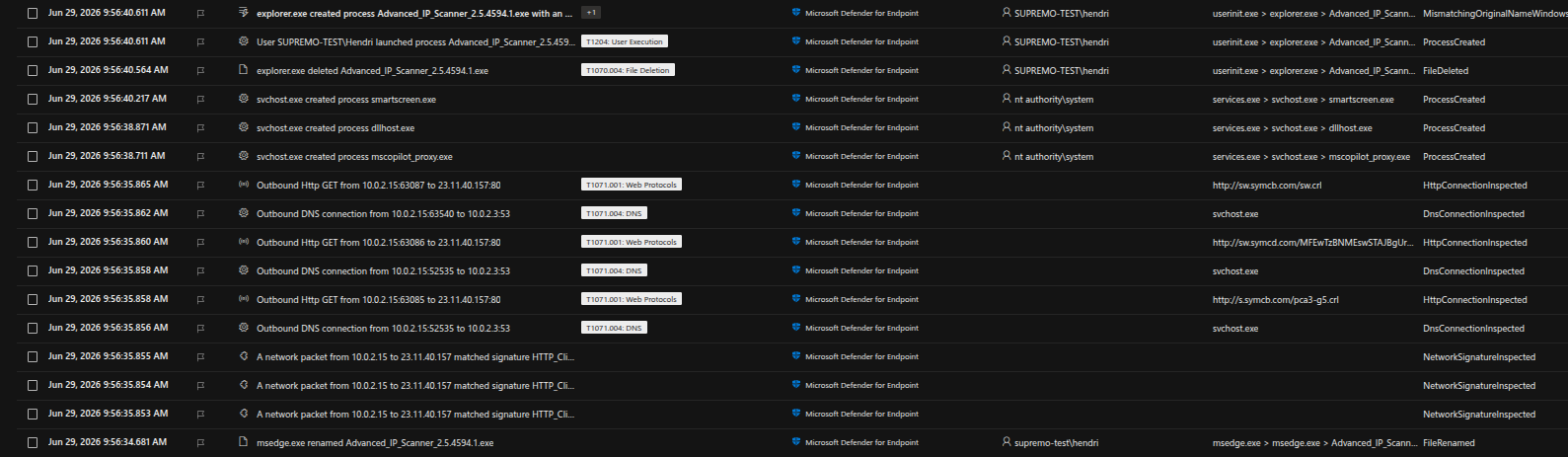
Figure 12: Advanced IP Scanner activity in MDE where no alerts generated for this version.
Following the compromise of further hosts in the network, there was indication of the threat actor attempting to review files on the compromised systems. This was likely in an attempt to obtain further information about targets of interest, or to find additional credentials that could allow them to traverse further in the network. From what was reviewed within the networks investigated, this appeared to be the primary mechanism the threat actor would use to acquire credentials used to access databases within the environment. The types of credentials the threat actors were after included:
- Cleartext usernames and passwords
- General database connection strings
- Java Database Connectivity (JDBC) URLs
The Road to El Database-orado: Databases and Fraud
This enumeration and subsequent lateral movement through RDP always led to one thing: attempted connections to the various databases inside the network. Using a tool called RazorSQL, the threat actor would try to connect to any exposed databases. As anyone who has attempted to connect to various different database management systems would attest, it can be daunting connecting to databases and ensuring that the syntax for executing statements is correct. RazorSQL seemingly provides a solution to this, due to the tool’s ability to interact with over 40 database types, which would most certainly cover a majority of databases that the threat actor would discover in the network.
In the incidents covered by MWR, the threat actor prioritised Microsoft SQL (MSSQL), likely due to the ability for them to not only compromise the data in the database, but also the potential to use stored procedures to compromise the underlying hosts. There were numerous indications of the xp_cmdshell stored procedure being used to compromise additional hosts and, ultimately, to reach the systems that let them turn access into fraudulent payouts. Additionally, compromise of the underlying hosts may have provided the threat actor with additional network visibility towards these systems of interest.
In the event that they could not connect to MSSQL databases, they would predominantly attempt to connect to databases that made use of JDBCs for authentication, which was likely due to their enumeration techniques resulting in JDBCs being acquired.
Barring the ability to compromise the underlying system, why did these threat actors focus on databases specifically? This was likely due to indication contained within the databases as to potential systems that could be used for monetary payout. Additionally, these systems may have contained transaction information, which would allow the threat actor to retrieve valid data for when they attempted to create fraudulent transactions.
Self-Improvement Journey: A Sudden Jump in Sophistication
All of the techniques used by the threat actor relied on trusted, commonly deployed tooling being used to interact with the systems in the network in order to get into a position to potentially perform a monetary payout. The monetary payout component, on the other hand, is where the sophistication level of the threat actor increased significantly. This was due to the use of custom malware, significant understanding of solutions, and stealthy techniques. As this differed so much from the techniques observed up until this point, it may have been indicative of:
- the initial access achieved by Dull Knife being sold on;
- the use of AI to develop custom exploitation toolkits or malware, as well as to improve the understanding of the targeted internal solutions; or
- the purchase of targeted malware from the dark web, or directly from other threat actors with knowledge of the solutions being targeted.
Due to the active nature of the cases that were investigated, the exact solutions that were being targeted will not be mentioned in this blog post; however, the techniques will be explained a little further to elaborate on this claim of increased sophistication.
In the cases investigated, there were predominantly two unique pieces of malware that were deployed:
- The first and more noticeable piece of malware targeted a piece of payment processing or switching software. This would allow the threat actor to essentially create transactions and append them to the payment pipeline through the altering of data pushed into queues on the backend payment processing infrastructure. This malware on the surface initially did not appear overly complex, but on closer inspection made use of two distinct components.
- Component one was a graphical user interface that allowed the threat actor to enter the values they wished to embed as transactions, which would then create a text file containing the transactions to be embedded. This GUI and its functionality were not complex in nature; however, the complexity of this malware was introduced during the second component.
- Component two used legitimate software code with some alterations in order to facilitate the successful transactions through retrieval of the content contained in the previously generated text file. This would make identification of the malware difficult, as on the surface it would not only look and perform like legitimate software, but would in fact leverage the legitimate software with some minor code modifications to create the fraudulent payments. Identification of this component would only be possible through strict integrity checking, file modification monitoring, or manual reviews of the individual software components themselves.
- The second piece of malware was also embedded directly into the software solution through the alteration of some of the solution’s installed files on the backend. By replacing the files with modified versions, the backend was forced to automatically approve certain transactions that were created through expected means. This would ensure that the transactions were occurring through legitimate means and subsequently cleared in a similar manner to normal expected transactions, thus evading some fraud prevention controls even though they were fraudulent and would usually be declined.
As highlighted in the brief overview of these findings, this level of sophistication did not align with the activities seen up until this point, and they were only detected due to external investigation into certain fraudulent transactions being flagged. Although the ability for the threat actor to interact with these systems was heavily dependent on the setup within the targeted organisation and thus may not be the same for all organisations using the same solutions. It is believed that even in different setups a similar approach may be successful, due to the direct alteration of trusted code. An interesting question arose during these investigations surrounding code signing and levels of trust, as the code that should be legitimately signed was being altered. However, for some of these cases, the files that were being replaced in the backend were themselves not legitimately signed, and could not legitimately be signed as they were not considered executable files, but rather class files that would be used during execution.
What’s In the Packet: The Detection Point
All of the activities conducted by the threat actor, barring some low-severity alerts that may be generated for Advanced IP Scanner, up until this point would have lent themselves to keeping the threat actor in the shadows. However, this threat actor, in all cases where we have encountered them, would make a critical error that would result in their subsequent detection. This was the use of Impacket in situations where they seemingly needed to acquire additional credentials to expand their reach within the organisation. Not only would they use Impacket, but they would place the entire Impacket Python package onto disk when they deployed their additional tools, which would result in the EDR products present generating high-severity alerts upon detection. Although the threat actors could still execute Impacket tools, as the EDR products didn’t necessarily remove the content, the security teams would at this point have visibility of the threat actor activity. This once again highlighted a significant lack of sophistication in the attacker during some points of the incident.
As this type of tool deployment would not occur with true advanced persistent threats, due to the certainty of detection, this indicated that the threat actors were likely not aware of the true detection capability within these corporate networks, or simply didn’t care as much about being detected as an advanced persistent threat would have.
Conclusion
Sometimes keeping it simple is the easiest path to success, and this sentiment was shared by the threat actors within the Dull Knife group. They are not an APT with ground-breaking techniques or expansive knowledge of digital networks — and to this, some won’t even consider them an “Advanced” Persistent Threat, but in the last six months they have been more successful than most threat actors seen targeting large African businesses. As long as they continue to be successful in their efforts, it is likely that these targeted attacks will continue.
So what can we as organisations do to prevent these threat actors and detect their activity? The simple answer is to create alerts pertaining to the various Remote Access Tools that exist, and under ideal circumstances these solutions should be avoided; if possible, restrictions should be implemented to ensure that these solutions cannot be used within your environment. Using online resources to keep track of the various Remote Access Tools on the market and their various indicators of compromise (IoCs) will assist with ensuring these detections are kept up to date. In the event that certain systems require the use of these solutions for administrative tasks, heightened monitoring should be implemented on these systems to ensure they are only being accessed by the intended parties. Having additional detections for interactions with, and authentications to, the various built-in local accounts will also help ensure that Dull Knife cannot continue using the same methods to compromise networks.
The use of shared accounts within any environment should also be restricted. Not only does using shared accounts significantly increase the attack surface surrounding the accounts, and as a result your environment, but it also significantly reduces the ability for an investigation to tie nefarious activities to specific users. Additionally, restricting local administrative access within our environments will greatly hinder their ability to perform the actions they commonly do, such as installing Supremo as a service.
Further to this, network restrictions can ensure that the paths used by the threat actors are limited. For example, ideally RDP should not be exposed to all devices on the network. Firewalls, whether network-based or host-based, should be used to restrict the protocol to only the devices that will be used by those who administer the systems and thus require access to RDP.
Finally, in the event that alerts are generated for “low risk” activities, such as the downloading of Advanced IP Scanner, due diligence should be used to ensure that the activity is not the result of threat actors performing actions that closely resemble expected activities within an environment.
This is the first of a two-part series on Dull Knife. The follow-up post will go deeper into the technical detail of the Remote Access Tools abused by this group, along with the detection rules and hunting guidance to identify their activity in your environment.


